



Are AI Photo Filters Worth It for a Sydney Corporate 360 Photo Booth?
AI photo filters are worth adding to a Sydney corporate 360 photo booth only if the booth underneath them is already reliable, because a filter cannot fix a booth that drops out halfway through the night. Planners across Sydney are being pitched background swaps, cartoon avatars and cinematic filters as the must-have upgrade for 2026 events. Some of it genuinely lands with guests. Some of it distracts from the thing that actually decides whether people use the booth: does it work, every single time, without a queue forming while software catches up? At Shutter360, we get asked about AI filters at almost every Sydney corporate briefing now, so here's what we tell clients.
Key Takeaways
Filters sit on top of the hardware, not instead of it. AI effects run through the booth's existing camera, lighting and connection. If that base setup is shaky, the filter just gives it a new way to fail.
Corporate guests move fastest with simple choices. A crowded filter menu adds decision time at a launch or conference, and decision time is what builds a queue.
Cloud-based filters need a stable connection. Real-time AI processing usually pulls from the internet, so a venue with patchy wifi can turn a slick feature into a stalled loading screen.
Branding control matters more than novelty. A filter that shifts your logo colours or crops your overlay works against the point of a branded activation.
Data handling is a fair question to ask upfront. Find out exactly where guest photos are processed and stored before agreeing to any AI feature at a corporate event.
The 360 format already drives sharing on its own. The slow-motion video clip, not an added filter, is usually what gets guests posting and tagging your brand.
What do AI photo filters actually change about a 360 booth?
An AI filter is software layered over the footage a 360 booth already captures. Background swap replaces the physical backdrop with a digital scene, without a green screen. Style filters push the video toward a cinematic, painterly or animated look in real time. Some providers now offer generated avatars, building a stylised character from a guest's face instead of using the footage directly. The newest versions, marketed as agentic AI, claim to read a guest's outfit and adjust lighting or background to match. None of this changes what the booth itself needs to do well: hold guests steady, capture clean footage under consistent light, and hand it off fast. The filter is a finishing step, not a replacement for the fundamentals.
Comparison | Plain 360 booth | 360 booth with AI filters |
|---|---|---|
Setup complexity | Standard, one connection point | Adds a processing layer, usually cloud-based |
Best guest count | Any size, unlimited sessions | Works best under 150 guests to avoid queue build-up |
Brand colour control | Locked to your overlay design | Can shift depending on the filter's rendering |
Most likely hiccup | None, if the setup is solid | Processing lag if venue wifi is weak |
Where AI filters genuinely help at a Sydney corporate event
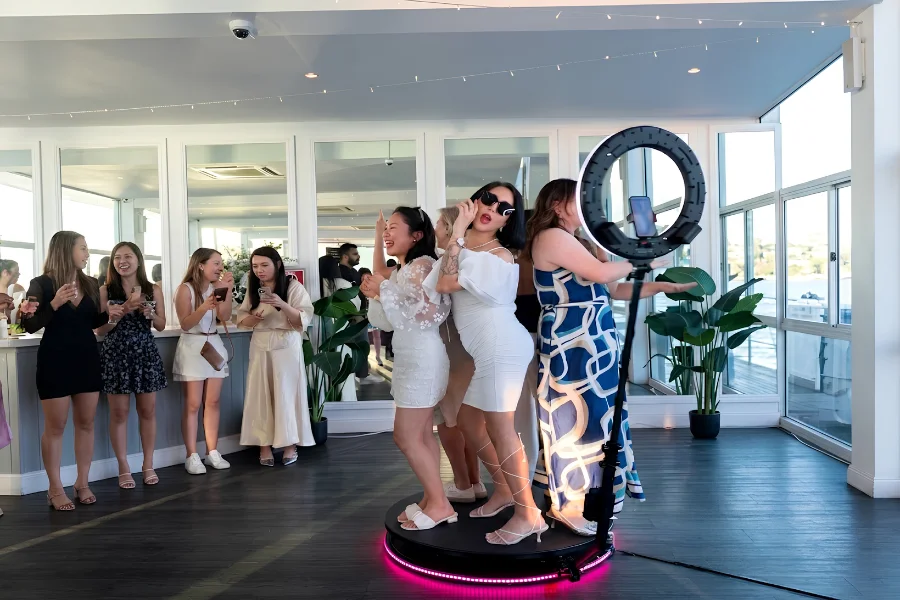
Product launches and brand activations are where AI filters earn their place. A background swap can drop guests into a campaign scene or product world without building a physical set, which matters when a launch venue in Sydney CBD has limited floor space. Marketing teams also like that a filtered clip stands out in a feed full of standard event photos. It adds the least value at a straightforward staff Christmas party, where guests care more about getting a great shot with their group than trying a new effect. We run our 360 photo booth hire in Sydney with a premium ring light and a custom-built platform as standard, and that consistent base is what makes any add-on actually usable on the night.
What's the reliability trade-off nobody mentions in the pitch?
Most AI filter systems process footage somewhere other than the booth itself, which means a stable internet connection isn't optional, it's load-bearing. Drop the connection and the filter either freezes the output or falls back to plain footage mid-event, right when a guest is standing there waiting. Processing lag is the second issue. A two or three second delay per guest adds up fast across an hour of unlimited sessions, and that's the kind of gap that turns into a queue at a conference with hundreds of attendees moving through in waves. There's also the data question. Guest photos moving through a cloud pipeline are only as safe as whoever built that pipeline, so ask the supplier plainly where the processing happens and how long photos are kept. If they can't answer clearly, that's worth flagging before the event, not after.
AI filters or a well-run 360 booth: which one actually gets shared?
Every Sydney photo booth operator now lists AI filters as an option, but almost none address the trade-off. Watching guests move through hundreds of corporate events, the format itself does most of the work. A 360 booth already produces something a standard camera can't, a slow-motion clip of the whole group, and that novelty is what gets shared. An AI filter can sharpen that further for the right audience, but it rarely rescues a flat, unbranded, poorly lit setup. Isn't that the real test for any add-on, whether it makes a good booth better, or just distracts from one that wasn't set up properly to begin with?
What we've learned testing add-ons at our own events
We trialled a background-swap filter at a product launch in Parramatta, at a client's request, alongside our standard setup. It looked sharp in testing. On the night, it added roughly four extra seconds to each guest's session while the background rendered, and with over 80 guests through the booth in the first hour, that gap started to show. Our attendant switched the group back to the standard branded overlay for the second half of the event, and nobody noticed the change. What people did notice was the booth itself: the ring light held consistent through a venue with mixed lighting, and the backup components we carry to every job meant zero downtime across the night. Guests remember whether the booth worked, not whether it had the newest filter attached.
What should you ask before adding AI filters to your booking?
Run through these before agreeing to any AI feature at a corporate event:
Where does the AI processing happen, on the device or in the cloud, and what happens if the venue's internet drops?
Can the filter match our exact brand colours, or does it apply a generic look across every event?
How much extra time does the filter add per guest, and has that been tested at our expected guest count?
What happens to guest photos after the event, and who has access to them?
Is there a fallback to standard footage if the filter fails mid-event?
A supplier who answers all five without hesitation has tested the feature. One who can't is asking you to be the test case.
Frequently asked questions
Do AI photo filters slow down a 360 photo booth queue?
They can. Real-time rendering typically adds a few seconds per guest, which compounds quickly at high-volume events. For conferences or launches expecting large crowds through a fixed window, test the filter's actual processing time before the event, not on the night.
Are AI filters worth it for a small Sydney corporate event?
Usually not. Under 50 guests, the novelty of the 360 format alone tends to be enough, and the added complexity of a filter rarely pays off for a shorter, lower-volume booking. A branded standard overlay does the job.
Can AI filters match our brand colours exactly?
Some can, but many apply a fixed rendering style regardless of your palette. Ask for a test render against your actual brand assets before the event, rather than relying on generic demo footage from the supplier.
Get the booth right first
A 360 booth that holds up all night, with a professional attendant running it and backup equipment on hand, is what gets your event talked about. Filters are worth layering on top once that base is locked in, not before. If you're weighing up AI add-ons for a Sydney corporate event, get a quote for 360 photo booth hire in Sydney and we'll walk you through what will and won't hold up on your event floor.
Ready to Capture Every Moment?
Bring the WOW factor to your next event with Shutter360's photobooth experience. Enquire today and let's make it unforgettable.